First budget,
5 steps.
You want a budget where every euro has a job. This guide shows you how to build zero based budget in Tracky in five practical steps, and it works in demo today.
You open a manual EUR checking account and link no bank at all. You bring in a bank CSV through a row-by-row preview, then tie one plan to that account as its only funding source.
Then you assign every euro until Ready to Assign reaches zero. You keep Unexplained at zero too, so each movement stays accounted for. Positive Available balances carry into next month, while cash overspending lowers Ready to Assign until you move money between buckets. Open the free demo and follow each step yourself: no card needed, guide included, first plan done today.
CREATE ONE MANUAL ACCOUNT
You open Accounts and add a manual checking account in EUR with a short name you recognize instantly every time. You set today's real balance as the starting point, because the plan only assigns money that truly exists right now. You connect nothing, so every later figure comes from this balance plus CSV rows you preview yourself first. This account becomes the single funding source for your first plan, and each assigned euro traces back to cash you hold now.
IMPORT A BANK CSV
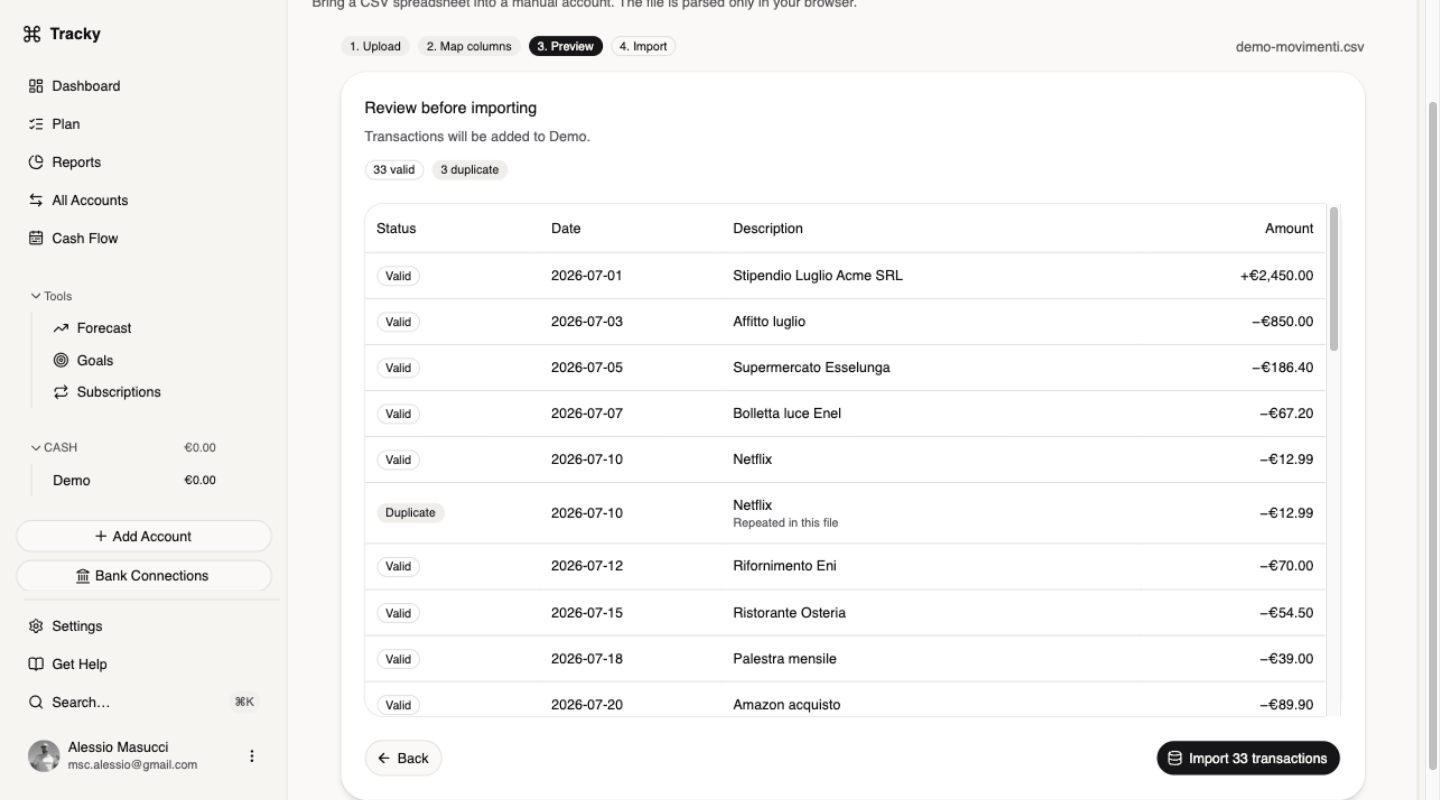
You export the CSV from your bank and bring it into Tracky on the account you just created. You map the three columns Tracky asks for, date, description, and amount, so each row lands correctly every time. You read the preview row by row and fix anything odd before anything is written, then confirm only when every row reads clean and complete. Your plan now holds real activity ready to assign, and Unexplained stays at zero from the very start.
CREATE THE PLAN
You create one plan and choose your manual account as its funding source. You keep one currency and one plan, so balances and assignments speak the same language throughout every month. The plan starts the day you create it: earlier movements stay inside today's balances yet create no activity and no overspending. If the origin looks wrong after a history import, use Restart from here to pick the first day that counts while groups, buckets, targets, and assignments stay intact.
ASSIGN EVERY EURO
You open the plan and fill each bucket with money sitting in your funding account right now. You continue until Ready to Assign reaches zero, because every euro needs a job and idle money drifts into unchosen spending. New income lands in Ready to Assign, never as negative spending inside a bucket, so you give it work the moment it arrives. You also bring Unexplained to zero, proving each account movement is attributed correctly and nothing extra ever appeared there.
WATCH AVAILABLE CARRY
You close the month and watch positive Available balances roll into the next one. That carry is how annual funds grow: what you skip spending stays in its bucket and lowers next month's need. When a cash row turns red, you move Available money from another bucket to cover it, because uncovered cash overspending lowers Ready to Assign instead of carrying over. When the red sits on card spending, you fund that card's payment bucket before the statement is paid.
Questions, answered.
Can I start if my history is messy?
You start anyway, because day one of the plan is the day you create it. Movements from before stay inside today's balances without creating activity or overspending. If that starting point feels wrong, open the plan selector and choose Restart from here for the first day that should count. Tracky keeps your groups, buckets, targets, and assignments, then rebuilds the history from the new origin.
Do I have to reach zero on day one?
That is the goal, not an obligation you must meet on day one. A positive Ready to Assign simply means some money still has no job, and money without a job tends to leave on something you did not choose. You get closer each time you sit down and assign. Even a partly assigned plan beats a month where spending comes before decisions.
What happens if I spend more than a bucket holds?
The bucket row turns red and asks for one of two fixes. For cash overspending you shift Available funds across from another bucket, or the gap reduces next month's Ready to Assign rather than rolling over. For credit overspending you fund the card's payment bucket, since the debt grew even though no cash has left yet. Either way the negative balance itself never moves forward.
How to build zero based budget that still works next month?
You carry positive Available balances into next month, building funds for yearly bills without extra work. You cover every red cash row by moving money from another bucket, so shortfalls never silently lower next month's Ready to Assign. New income always lands in Ready to Assign first. Each month then starts from real balances, and the plan keeps working.