Retire
the sheet.
Spreadsheets copy balances by hand and age by the hour. Tracky anchors the plan to observed, dated balances, assigns every euro, and forecasts the 27th. Same discipline, none of the plumbing.
You already run a tight ship in Excel. But in any honest budget app vs Excel spreadsheet comparison, the sheet itself is the bottleneck: you type balances by hand, you fix formulas in silence, and history lives in filename_v7_final. You deserve the same discipline without the plumbing. You check the sheet, not your life.
Tracky anchors your plan to observed, dated balances instead of pasted values. You give every euro a job in Plan buckets with Assigned, Activity, and Available, and you see Safe to spend before you spend it. Cash-flow projection lists every known commitment by date and flags the first negative day, as estimates from known items, not guarantees.
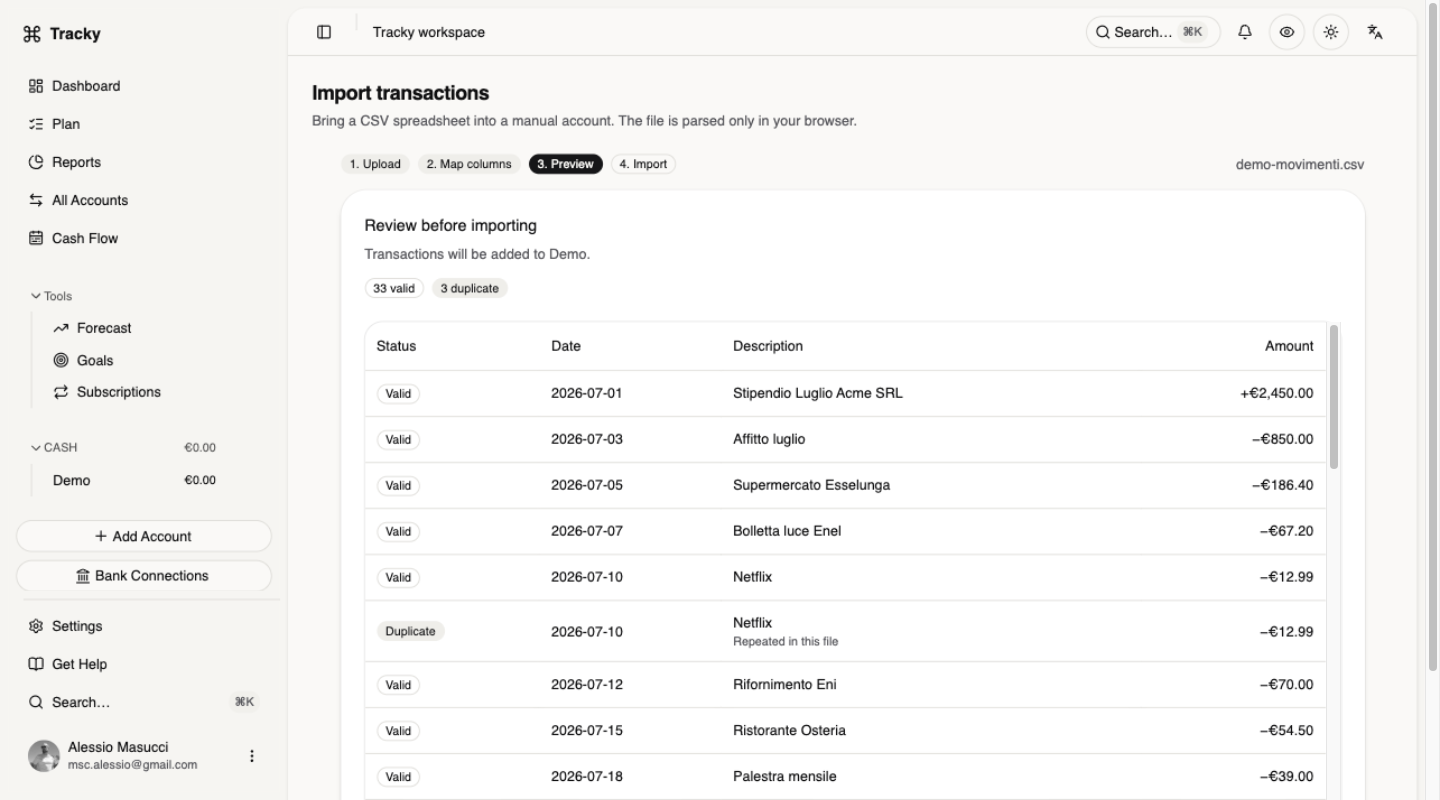
You keep CSV both ways: import bank exports into manual checking or card accounts with mapping, preview, and safe duplicate skipping, then export report totals whenever you want. Balances stay dated and queryable, and the free demo lets you try the flow before you commit. No versioned filenames, no silent edits. Your plan finally matches reality. Keep the CSV. Drop the chores.
📉 THE SHEET
- Balances typed by hand
- Formulas break silently
- One editor, many viewers
- History in filename_v7_final
📈 TRACKY
- Observed balances, dated
- Invariants enforced in code
- Same numbers for everyone
- History queryable, exportable
Where the sheet breaks
Every month starts with the same ritual. You paste balances, chase a broken reference, and ask who touched column D. One editor types while everyone else watches, and the truth ages by the hour. Recurring payments hide in rows you forgot to copy. Card spending looks like cash until the statement lands, and mixed history across tabs never tells you what is safe to spend today. You reconcile the past instead of steering the month. Currencies mix in one total and mislead you. You want a plan you can trust at a glance.
Budget app vs Excel spreadsheet: what changes on day one
Your balances become observed and dated, not typed. You assign money you already hold into buckets, track Assigned against real Activity, and read Available before every decision. The same numbers serve everyone, with history you can query and export. Cash-flow projection turns known commitments into a dated calendar and shows the first negative day, as estimates, not guarantees. Subscription suggestions flag possible renewals, but you confirm merchant, amount, and cadence. Each currency stays separate, card debt stays debt, and virtual money boxes reserve only cash you hold. You steer with facts, not formulas.
From pasted rows to dated balances
Bring one bank export and start small. You create a manual checking or card account in the file's currency, upload a CSV with a header row, and map date, description, counterparty, and amounts. Your file is parsed in the browser, and only valid rows you confirm are sent. You review each row as Valid, Duplicate, or Error, apply one category or let your description rules run, and re-import safely because duplicates are skipped without touching the balance. Then you export report totals to CSV whenever you want. The free demo walks you through the same flow.
Questions, answered.
In a budget app vs Excel spreadsheet comparison, what do I actually keep?
You keep your CSV habit and your discipline. You import bank exports into manual checking or card accounts with mapping and preview, work from observed dated balances, and export report totals whenever you want. Each currency stays separate, and the free demo lets you test the flow first.
How do I move my history without creating duplicates?
Upload a CSV with a header row, map the columns, and review the Valid, Duplicate, or Error badge on each row. Tracky flags repeats by account, date, direction, amount, currency, and normalized description, so you can re-import the same file after an interruption and only new valid rows are added.
What happens to my recurring payments?
Tracky suggests possible subscriptions from merchant, amount, and date spacing, and you confirm each renewal before it counts. Active items enter Cash Flow as known commitments alongside planned expenses and statements. The projection stays an estimate from known items, never a guarantee, so you see the next due date early.
Do I lose my envelope system?
No, you upgrade it. You create virtual money boxes for each purpose, link one to a Plan bucket, and the saved amount shows as Already set aside so targets ask only for the rest. Recording a contribution does not move bank money, and Safe to spend subtracts only funding still due in the cycle.